| Stop drawing names out of a hat for your Christmas or other occasion gift
exchanges. |
| Participants do not have to be together to conduct the drawing. Result can be automatically emailed to each participant. This provides
privacy; the operator of the program does not see the name drawn for each
person. Emails may be sent using Outlook or directly using a POP/SMTP mail
server. SSL (secure sockets layer) connections are supported to allow
sending notifications using Gmail. |
| Participants in the drawing may be chosen from the Outlook/Outlook Express address
book. You may change the email address for participants in Outlook. You will
not have to update the email addresses in Gift Exchange each time you perform
a drawing. (Outlook is not required. The email addresses may be manually
entered). |
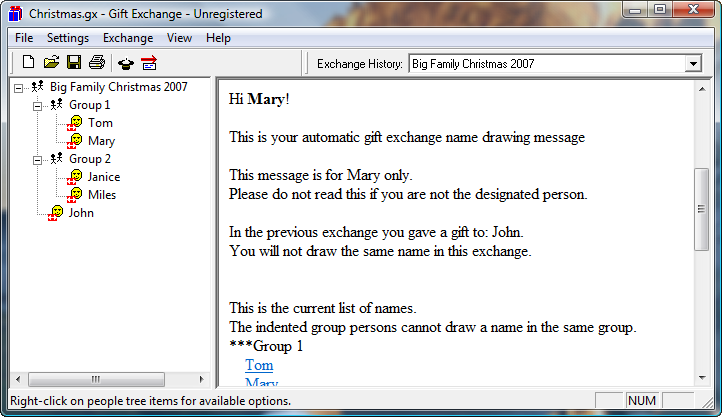
| People tree allows exclusions of spouses or group members from
drawing a name in the same group. |
| Memory of previous drawing prevents people from drawing the same name as
the previous drawing. |
|
Each participant may be designated as "Gives and receives a gift in shared
exchange", "Gives and receives in shared exchange, also may give to receive
only participant(s)", "Does not receive gift, may give to receive only
participant(s)", or "Does not give gift, receive only. For example, child". |
| The result can be printed for each participant without email, or who want
a printed copy immediately. |
|
Summary display shows the name drawn and gift given for each person for
previous drawings. |
| Your exchange information is maintained on your own computer so it is
private. This is not a web service; there is no advertising or spyware.
Various exchange files may be created and saved. For example, an exchange file
can be used for your direct family. A separate file may be used for an
exchange for your spouse’s family. |
| Logging feature shows history of
various activities and results such as emails sent successfully. |
| Optional HTML links may be included in emails to send gift suggestions for any
participants to the exchange organizer. The organizer may add any suggestions
received to the list and send out emails again including the suggestions. |
Try Now (Download is fully functional except for limitation of five
participants):
Right-click the link below and select "Save As..." to download the file to your local hard
disk. Double-click the file to launch the installer.
GiftEx30.msi
(Version 3.00.2 - 8.4M Windows Installer - Double-click the file to perform the installation.)
GiftEx26.doc (500K User Guide)